Earn with Fada’s Refer & Earn program
Share your referral link and earn 30% of what every business you refer pays — every month, for as long as they stay.
Published 10 June 2026 · 5 min read · Fada
You already know teams that could use a better way to chat, organize work, and keep their files in one place. With Fada's Refer & Earn program, telling them about it pays you back — not once, but every single month they keep using Fada. You share a link, a business signs up through it, and you earn 30% of what they pay for as long as they stay a customer.
This is a recurring reward, not a one-time bonus. Refer a handful of active businesses and you build a steady monthly income that keeps coming in while you do nothing else. Here is exactly how to set it up and get paid.
Why this is worth your time
Fada is easy to recommend because it is genuinely easy to start. It is free to begin with — no credit card needed — so the people you refer can try it with zero risk. When a team is ready to upgrade, Business is one flat monthly price for the whole team, not a per-person charge, which makes the decision simple for owners who hate surprise bills.
It also fits real teams with real-world constraints: your team can work naturally, with comfortable reading, so nobody is forced to work in a language that fights them. If you have already walked a team through getting started with Fada, you know how quickly people get comfortable — which means the businesses you refer are likely to stick around, and that is exactly what keeps your earnings coming.
Step 1 — Open Refer & Earn and grab your link
In the left rail of Fada, click the Refer & Earn tab. This opens your personal referral dashboard.
At the top you will find your own referral link — it looks like fadadz.com/r/your-name. Use Copy link to put it on your clipboard, or Share it directly to wherever your contacts are: a chat, an email, a social post, or a message to a client.
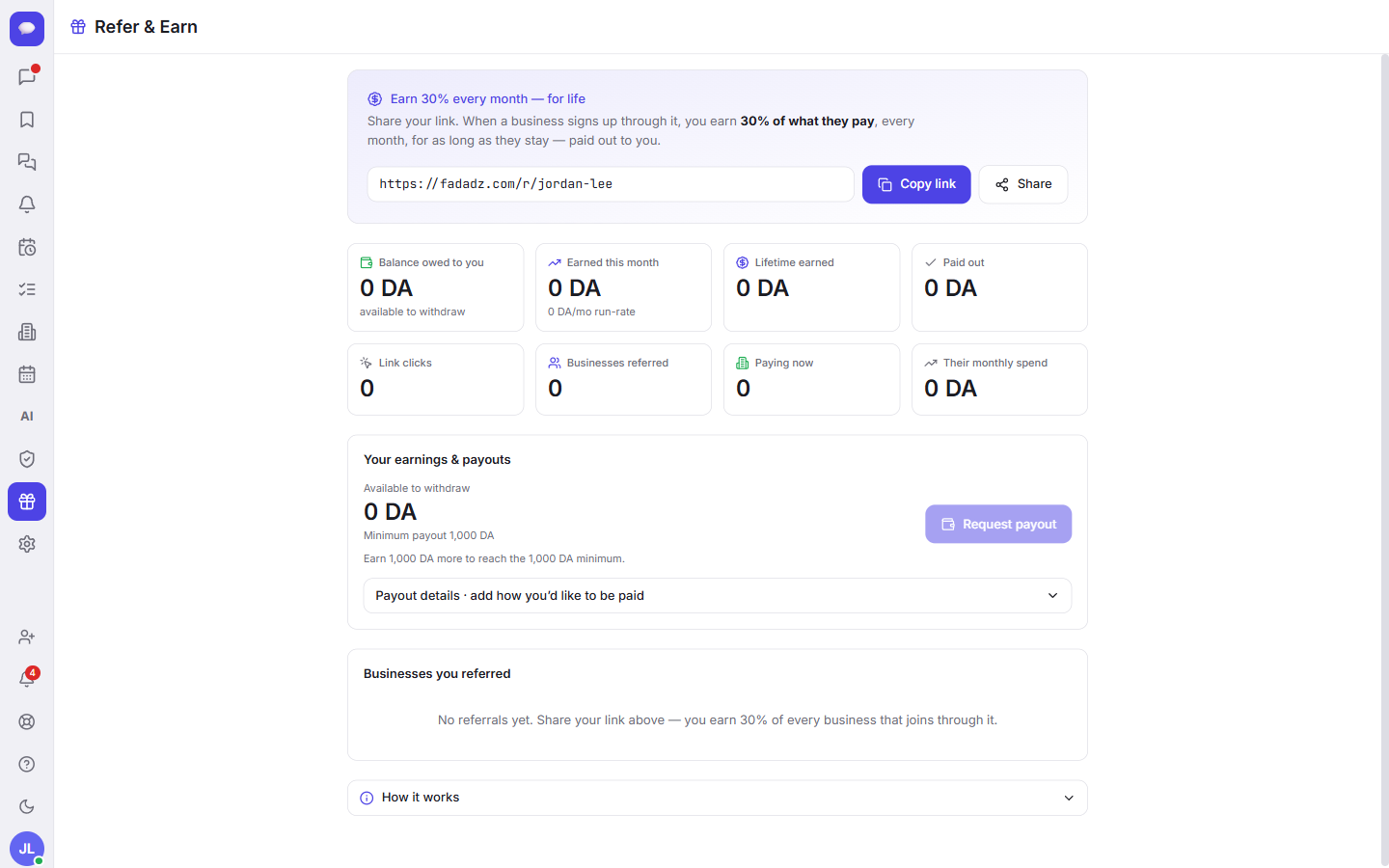
That link is the whole engine. Anyone who signs up for Fada through it is tied to you — automatically and permanently — so you get credit for every business you bring in.
Step 2 — Share it where it counts
You do not need to be a marketer. The most effective shares are simple and personal:
- Send it to a business owner you already help with tech or admin.
- Drop it in a group of freelancers, agencies, or small-business peers.
- Add it to your email signature or your social bio.
- Mention it when someone complains about messy group chats or scattered files.
A few helpful talking points: Fada is free to start, the Business plan is one flat price for the whole team instead of charging per person, your data can be self-hosted if a company is privacy-conscious, and background notifications work through standard web push — so there is no app-store app to install just to get notified.
If you are introducing a whole team, it is worth showing them how to invite their team once they are in — teams that get everyone onboard quickly are the ones that stay, which protects your monthly earnings.
Step 3 — Watch your earnings add up
Your dashboard does the bookkeeping for you. At a glance you can see:
- Balance owed — what is waiting to be paid to you right now.
- Earned this month and lifetime earned — your recent and all-time totals.
- Paid out — what you have already received.
- Link clicks — how many people opened your link.
- Businesses referred — everyone who signed up through you.
- How many of those are paying now, and their combined monthly spend.
Remember how the reward works: when a business signs up through your link and pays for Fada, you earn 30% of what they pay — every month, for as long as they remain a customer. Three or four active paying businesses can turn into a reliable monthly amount that simply keeps arriving.
Step 4 — Get paid
Once your balance reaches the minimum payout of 1,000 DA, you can cash out. Add your payout details in the dashboard, then click Request payout. Your paid-out total updates so you always know where you stand.
If anything about the rates, timing, or rules is unclear, open the How it works section on the same page — it lays out the details so there are no surprises.
A few honest notes
- You earn on what a referred business actually pays. Businesses on the free plan are great for your referred count and may upgrade later, but the 30% reward applies to paying customers.
- The recurring reward lasts as long as the business stays a customer — which is why recommending Fada to teams that genuinely need it works better than spraying the link everywhere.
- Everything — your link, your clicks, your earnings, and your payouts — lives in the one Refer & Earn tab, so you never have to chase numbers across different tools.
Start earning today
Recommending a tool you would use anyway, and getting paid every month for it, is about as straightforward as side income gets. Open the Refer & Earn tab, copy your link, and send it to one business owner today — then let the dashboard track the rest.
If you are not on Fada yet, start a free Fada workspace, set up your team, and your referral link will be waiting for you. Share it once, and let it keep working long after you have moved on to the next thing.
Bring your team together on Fada
Create your workspaceKeep reading
Connect WhatsApp to Fada: get customer messages in your team inbox
A step-by-step guide to linking your WhatsApp Business number to Fada with the official Cloud API — so customer messages land in your team inbox and everyone replies from one place. Includes every setting, link, and the gotchas that trip people up.
How to invite your team to Fada (and set the right roles)
Create an invite link, bring teammates into your workspace, and choose who is an owner, admin or member — step by step, with screenshots.